Why are some menu options on my TV grayed out?
Important Note: The information on this page is for Hong Kong products only. Models, sequences or settings will vary depending on location and/or where the product had been purchased. To be redirected to your local support page please click here.
Why are some menu options on my TV grayed out?
The menu options you have access to on many Samsung TVs depend upon:
● The channel you are watching
● The video source you have selected
● The screen size you have selected
● The resolution of the source you have selected
● The format (analog, digital) of the source you have selected
● Other menu settings
For any given channel, resolution, screen size, video source, etc., there will always be some menu selections that are unavailable. For example, on many TVs, the Film Mode function only works if the source you have selected has a resolution of 480i. It is unavailable if the video source has any other resolution (480p, 720p, 1080i, or 1080p).
For example: (on many LED TVs)
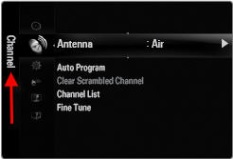
If your current source is HDMI, you cannot access the Channel portion of the menu.
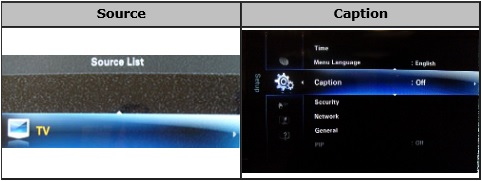
If you are on any source other than "TV" Closed Caption will be grayed out.
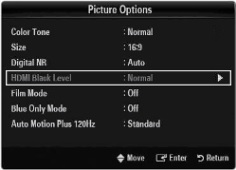
If your external device already supports the expanded black level range "HDMI Black Level" will be grayed out.
Menu options or functions that are unavailable are grayed out. If a menu item is grayed out, try changing one or more of the factors above to see if you can un-gray it.
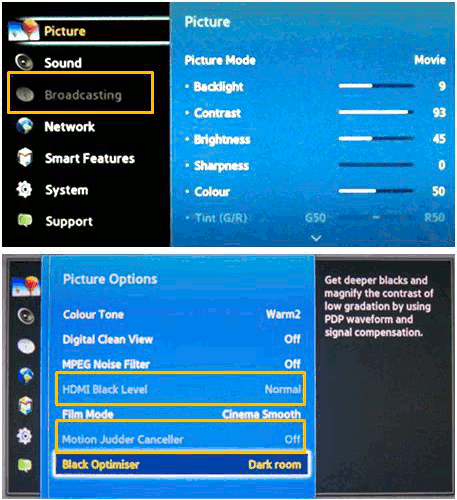
( Menu options grayed out )
NOTE : User manual may have information about the menu item and the conditions under which it will be unavailable and grayed out.
If the above information does not match what your product is showing, you may check the User Manual for your product. If you are unable to solve the problem, please contact us for further assistance.
Thank you for your feedback!
Please answer all questions.
RC01_Static Content : This text is only displayed on the editor page