How do I take pictures by Slow motion mode on Galaxy S6/S6 edge (Hong-Kong version)?
Important Note: The information on this page is for Hong Kong products only. Models, sequences or settings will vary depending on location and/or where the product had been purchased. To be redirected to your local support page please click here.
To use Slow motion mode, follow the steps below:


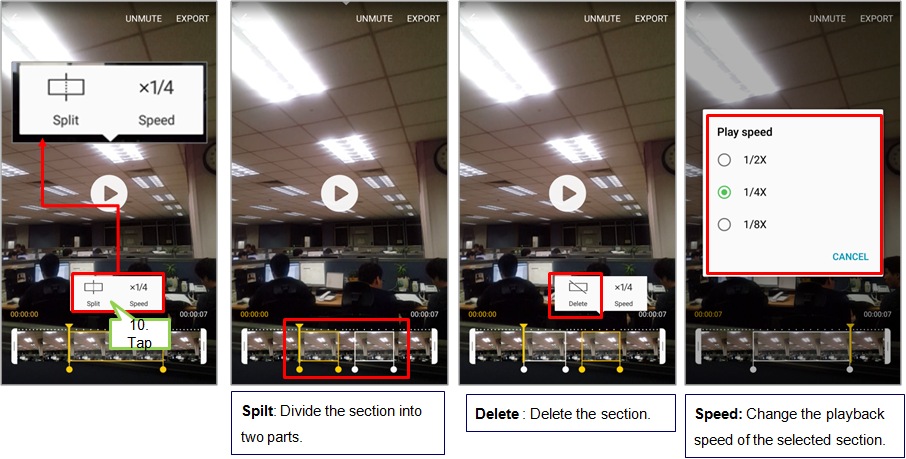
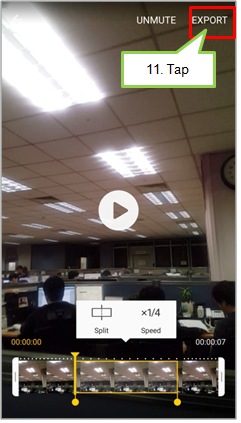
To set a slow motion section more precisely, tap and hold up arrow, and then drag your finger to the left or right to move through the section frame by frame.

• Speed : Change the playback speed of the selected section.
• Split : Divide the section into two parts.
• Delete : Delete the section.
The above product description is only applicable to the “Camera” application version released in 2015 on Samsung Galaxy S6, Samsung Galaxy S6 edge and/or Samsung Galaxy S6 edge+ in Hong Kong, and for reference only.
All images are for reference only.
If the above information does not match what your product is showing, you may check the User Manual for your product. If you are unable to solve the problem, please contact us for further assistance.
Thank you for your feedback!
Please answer all questions.
RC01_Static Content : This text is only displayed on the editor page